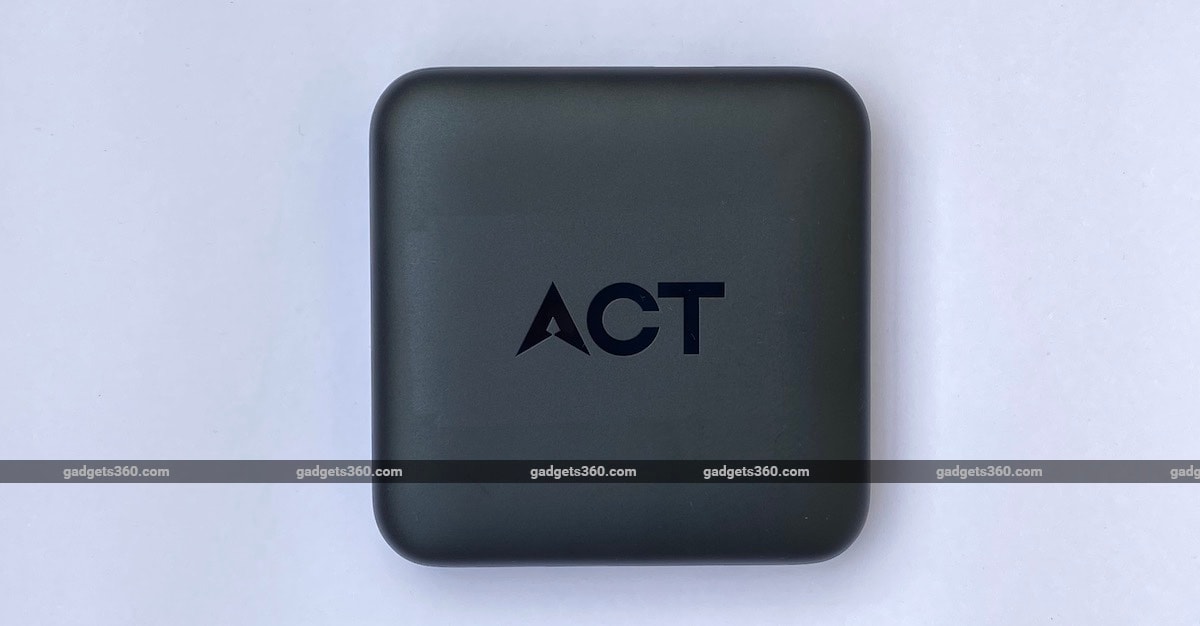
ACT (Atria Convergence Technologies Ltd.) is perhaps best known as an ISP that offers services in some parts of the country under its brand ACT Fibernet. Few people know that the company also operates a Digital TV brand called ACT Digital. Recently, the company launched the ACT Stream TV 4K, a product aimed at cord-cutters that attempts to bring its two businesses together.
The ACT Stream TV 4K is essentially a streaming box that also lets you watch Live TV over the Internet. The box itself is pretty nondescript, roughly the same size as an Apple TV, and it has all the ports you would expect. At the back, you have an HDMI port, an Ethernet port, 3.5mm and SPDIF digital audio out ports, and the power adapter inlet. On the right you have two USB ports and a microSD card slot to plug in external media.
Setting up the box is fairly simple, though you will need to be an ACT Fibernet subscriber to get started, since one of the steps requires you to authenticate yourself as one. ACT says it eventually plans to offer the box to everyone, but for now, it\'s only being offered to ACT Fibernet subscribers. Once the box has been set up and activated though, you can use it with any Internet connection, and we verified this by using it with an Airtel broadband connection.
The box itself runs Android TV version 9 and the main home screen will look very familiar if you\'ve used Android TV or any other smart TV interface before. The UI is divided into four parts — the Home tab, an Apps & Games tab, a Live TV tab, and an Offers tab. Each of these four tabs has a carousel at the top highlighting specific content, followed by rows of additional icons.
The carousel on the home screen features manually curated content from various streaming services such as Netflix and Hooq, among others, as well as shows and movies on air right now from channels part of the Live TV service. This is followed by a row for the apps installed on your box, and another row showing the live channels you\'ve watched recently (something we\'ll touch upon shortly). A row called Movies highlights the movies currently being “broadcast” right now across all live TV channels. Finally, you get other popular/ featured/ trending content from streaming services including Hungama, Hooq, and Zee5.
The Apps & Games tab also features (different) content from various streaming services in a carousel, followed by fairly standard rows highlighting your installed apps and games. The Offers tab highlights special offers for ACT Stream TV 4K customers, for example we saw one for a free two-month Hooq subscription, as well as ongoing offers on Live TV channel packs. There\'s a bit of sameness to some parts of the UI, and over the two months that we spent using the product, some of the thumbnails in the carousel didn\'t update at all, even ones that were pointing to Live TV shows that were obviously no longer available.

That brings us to the Live TV tab, which sets this box apart from most other Android TV devices in the market. Apart from another carousel at the top that highlights featured shows currently airing (again, not updated regularly enough, if at all), you get a row called My Channels featuring your recently watched channels, followed by channels grouped by categories, with a row for each category like Entertainment, News, Sports etc.
Selecting a channel starts streaming it over your Internet connection. At the moment, you\'re offered a selection of 89 channels, a list that seems to be consistent across all cities. Sixty five of these channels are offered to all subscribers for free, and the other 24 are part of the “Starter Pack” premium channels bouquet. As an introductory offer, ACT is offering this pack to all ACT Stream TV 4K users for free as of now, though it says you\'ll be charged Rs. 50 per month as part of your monthly broadband bill once the offer expires.
ACT Stream TV 4K Live TV channel packs
Free channels
- ACT 24x7 News HD
- DD National HD
- DD News HD
- 9X Jakas
- 9X Jalwa
- 9XM
- 9Xo
- Aastha Bhajan
- Aastha TV
- ABP News
- ACT TV
- Aljazeera Intl
- APN
- Asianet News
- B4U Movies
- B4U Music
- Captain News
- Captain TV
- Care World
- Channel One News
- Cnnb
- DD Loksabha
- DD News
- DD Podhigai
- DD Rajyasabha
- DD Sapthagiri
- DD Sports
- Filmy
- FTV
- Home Shop 18
- India News Punjab
- India TV
- Jai Maharashtra
- Kalaignar Sethigal
- Kalaignar TV
- Kathyayani
- Khabrein Abhi Tak
- Kolkata TV
- Music India
- Music Zone
- News 9
- News India 24x7
- News X
- OTV
- Polimer News
- Polimer TV
- Pudhiya Thalaimaria
- Republic Bharath
- Republic TV
- Rupasi Bangla
- Russia Today
- Sakshi TV
- Sanskar
- Satsang
- SVBC
- Thanthi TV
- Tolly Wood
- TV 5 Kannada News
- TV 9 Kannada
- TV 9 Telugu
- TV1 Telangana
- TV5 Telugu
- TV9 Gujrathi
- Vedic
- VTVnews
The full list of these channels is reproduced above. There are a few popular ones such as BBC World and the Discovery family of channels, as well as some regional fare, but most of the mainstream channels that you might want to watch are missing. With that said, most content offered by major providers like Zee, Sony, and Star is available via their respective apps, so there are other ways to watch your favourite shows.
The majority of channels are being streamed in SD, though a few of them are available in HD as well. The video quality we experienced was similar to what we saw with services like Hotstar and Sony Liv on our 100Mbps line. The box\'s Internet usage will count towards your FUP quota, and there are no special benefits on that front.
The Live TV Guide shows a schedule of all available channels. Once you start watching a TV channel, you can use the up/ down buttons on the remote to cycle through channels in that particular category, which we quite enjoyed as a \"throwback\" to mindlessly surfing through channels on broadcast television. Switching between channels is pretty fast, unlike some IP-based TV offerings we\'ve come across in the past. Though ACT talks about the ability to “timeshift” live TV (i.e. see shows at a later stage) using the box, we didn\'t come across the option anywhere. There\'s no companion app either.
Talking about the remote, that\'s one of our favourite aspects of the device. Instead of trying to be needlessly clever, ACT has kept things simple and included all the important buttons you would like. Additionally, there are dedicated buttons for Netflix, Live TV, YouTube, and Google Play, which do exactly what you expect them to.
Other aspects of using the box are pretty similar to using any other Android TV box. All the standard apps that you expect are either pre-installed or available via Google Play, except for Amazon\'s Prime Video app, which isn\'t available for this device yet even though Google and Amazon have made their peace. ACT says the app will be available for the ACT Stream TV 4K, though it refuses to say when. Thankfully, you can cast content from the Prime Video app — or any other compatible app — on your iPhone or Android phone to the ACT Stream TV 4K.
This means that at least for now, YouTube and Netflix apps are your only options if you are looking to stream 4K content. Though the Netflix app on the box refused to stream at anything higher than HD when we had the ACT Stream TV 4K paired with the Philips BDM4350UC 4K monitor (even though the box was outputting at 4K resolution), we enjoyed 4K content via Netflix without any problems when the box was connected to a 50-inch Samsung MU6100 Smart TV.
YouTube, on the other hand, streamed in 4K on both panels without any issues, which was hardly a surprise. You can of course play 4K media from external devices such as pen drives and microSD cards, something we managed without any problems during our tests.
Verdict
The ACT Stream TV 4K is a device with a lot of potential. Between the Live TV offering and the popular streaming apps, this box has the most common sources of TV shows and movies covered. We wish that the native Amazon Prime Video app would become available soon, and we are curious to see how ACT plans to supplement its Live TV offerings in the future. We\'re also big fans of the remote, which delivers pretty much everything you\'d want by keeping things simple, and should be a sign to other manufacturers.
Our biggest complaint about the box is that ACT itself doesn\'t seem to be taking it too seriously. Content curation has been in a state of complete neglect, which really mars the user experience for anyone coming in and trying the box for the first time. Available with just a refundable deposit of Rs. 1,500 to ACT customers for now, the box sounds like a no-brainer if you are an existing ACT customer, but its long-term success will depend on how both the pricing and the product evolve from here.